> For the complete documentation index, see [llms.txt](https://docs-embed.anyflow.jp/llms.txt). Markdown versions of documentation pages are available by appending `.md` to page URLs; this page is available as [Markdown](https://docs-embed.anyflow.jp/solution-editor/common-specs/schema-definition.md).

# スキーマ定義

## json**概要**

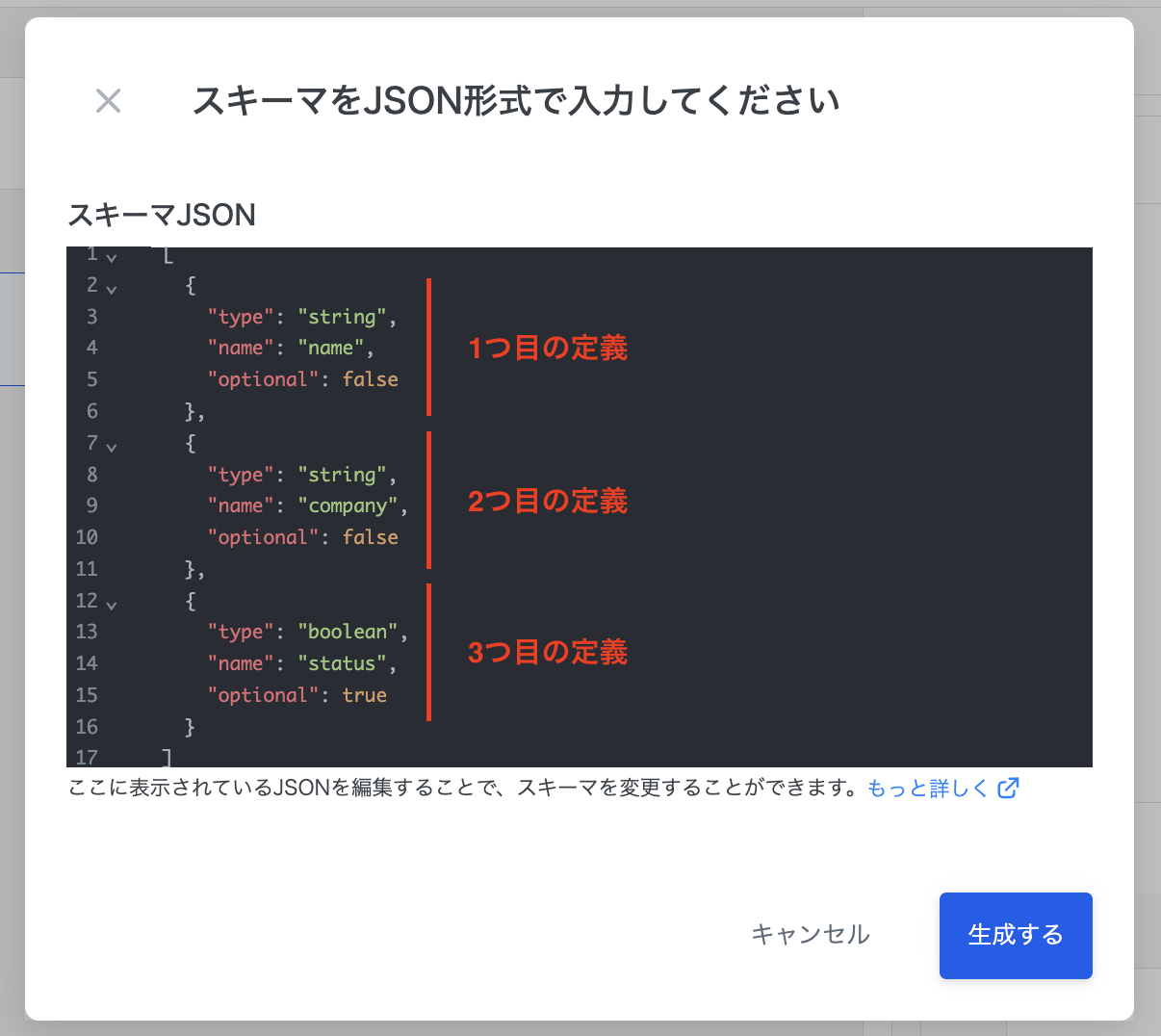
スキーマJSONのモーダルでは、以下の様に各スキーマ定義を配列にまとめて一度に設定することができます。

```json
[
  {スキーマ定義},
  {スキーマ定義},
  {スキーマ定義}
]
```

<figure><img src="https://files.readme.io/6453a6f-image.png" alt=""><figcaption></figcaption></figure>

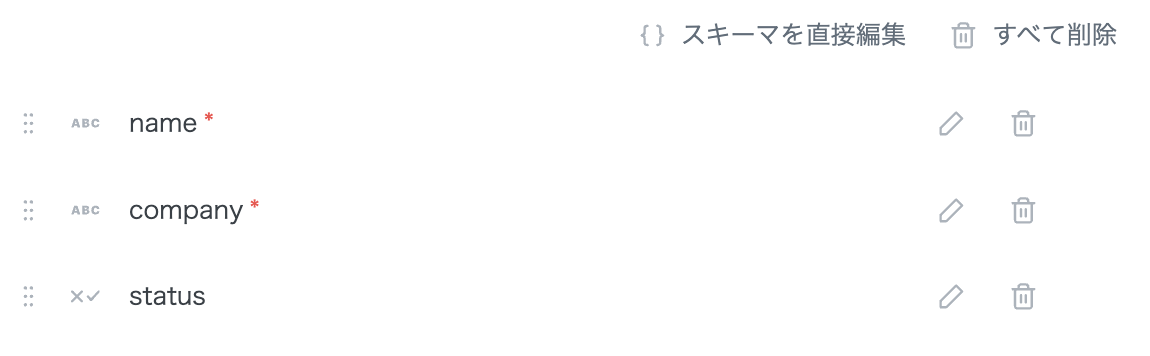
上記を入力して「生成する」を実施すると、3つの項目が生成されます。

<figure><img src="https://files.readme.io/438cf65-image.png" alt=""><figcaption></figcaption></figure>

1. string型でnameという名称の必須入力の項目

```json
{
    "type": "string",
    "name": "name",
    "optional": false
}
```

<br>

2. string型でcompanyという名称の必須入力の項目

```json
{
    "type": "string",
    "name": "company",
    "optional": false
}
```

<br>

3. boolean型でstatusという名称の任意入力の項目

```json
{
  "type": "boolean",json
  "name": "status",
  "optional": true
}
```

***

## **json仕様**

<table><thead><tr><th width="122.28515625">キー</th><th>値</th></tr></thead><tbody><tr><td>type</td><td>スキーマの型を指定します。型は以下から選択します。<br><code>string</code> , <code>boolean</code> , <code>integer</code>, <code>decimal</code>, <code>date</code> , <code>datetime</code>, <code>array</code>, <code>object</code></td></tr><tr><td>name</td><td>任意の名称を指定します。</td></tr><tr><td>optional</td><td>入力を任意にする場合はtrueを、必須の場合はfalseを指定します。</td></tr><tr><td>element</td><td><code>array</code>型の場合に使用します。<br>配列は、共通のスキーマを持つ複数の要素から構成されるため、その共通のスキーマを1つ定義します。</td></tr><tr><td>properties</td><td><code>object</code>型の場合に使用します。<br>オブジェクトは、複数のスキーマを持つ1つの要素のため、複数のスキーマを配列でまとめて定義します。</td></tr></tbody></table>

型ごとに仕様が決まっています。

`string` , `boolean` , `integer`, `decimal`, `date` , `datetime` の場合

```json
{
  type: "string" | "boolean" | "integer" | "decimal" | "date" | "datetime",
  name: "任意の名称",
  optional: true | false
}
```

`array` の場合

```json
{
  type: "array",
  name: "任意の名称",
  optional: true | false,
  element: Schema | null
}
```

`object` の場合

```json
{
  type: "object",
  name: "任意の名称",
  optional: true | false,
  properties: Schema[]
}
```


---

# Agent Instructions
This documentation is published with GitBook. GitBook is the documentation platform designed so that both humans and AI agents can read, navigate, and reason over technical content effectively. Learn more at gitbook.com.

## Querying This Documentation
If you need additional information that is not directly available in this page, you can query the documentation dynamically by asking a question.

Perform an HTTP GET request on the current page URL with the `ask` query parameter, and the optional `goal` query parameter:

```
GET https://docs-embed.anyflow.jp/solution-editor/common-specs/schema-definition.md?ask=<question>&goal=<endgoal>
```

`ask` is the immediate question: it should be specific, self-contained, and written in natural language.
`goal` is optional and describes the broader end goal you are ultimately trying to accomplish on behalf of the user. GitBook uses it to tailor the answer towards what is most useful for that goal.

The response will contain a direct answer to the question and relevant excerpts and sources from the documentation.

Use this mechanism when the answer is not explicitly present in the current page, you need clarification or additional context, or you want to retrieve related documentation sections.
