> For the complete documentation index, see [llms.txt](https://docs-embed.anyflow.jp/llms.txt). Markdown versions of documentation pages are available by appending `.md` to page URLs; this page is available as [Markdown](https://docs-embed.anyflow.jp/solution-editor/common-specs/formula.md).
# Formula
Formulaの設定方法について
## 概要
Anyflow Embedでは、Formulaを使用してデータを加工/変換することが可能です。\
FormulaはPythonによって記述することができます。
## 入力フィールドでFormulaを利用する方法
Formulaは、ほとんどの入力フィールドで利用可能です。\
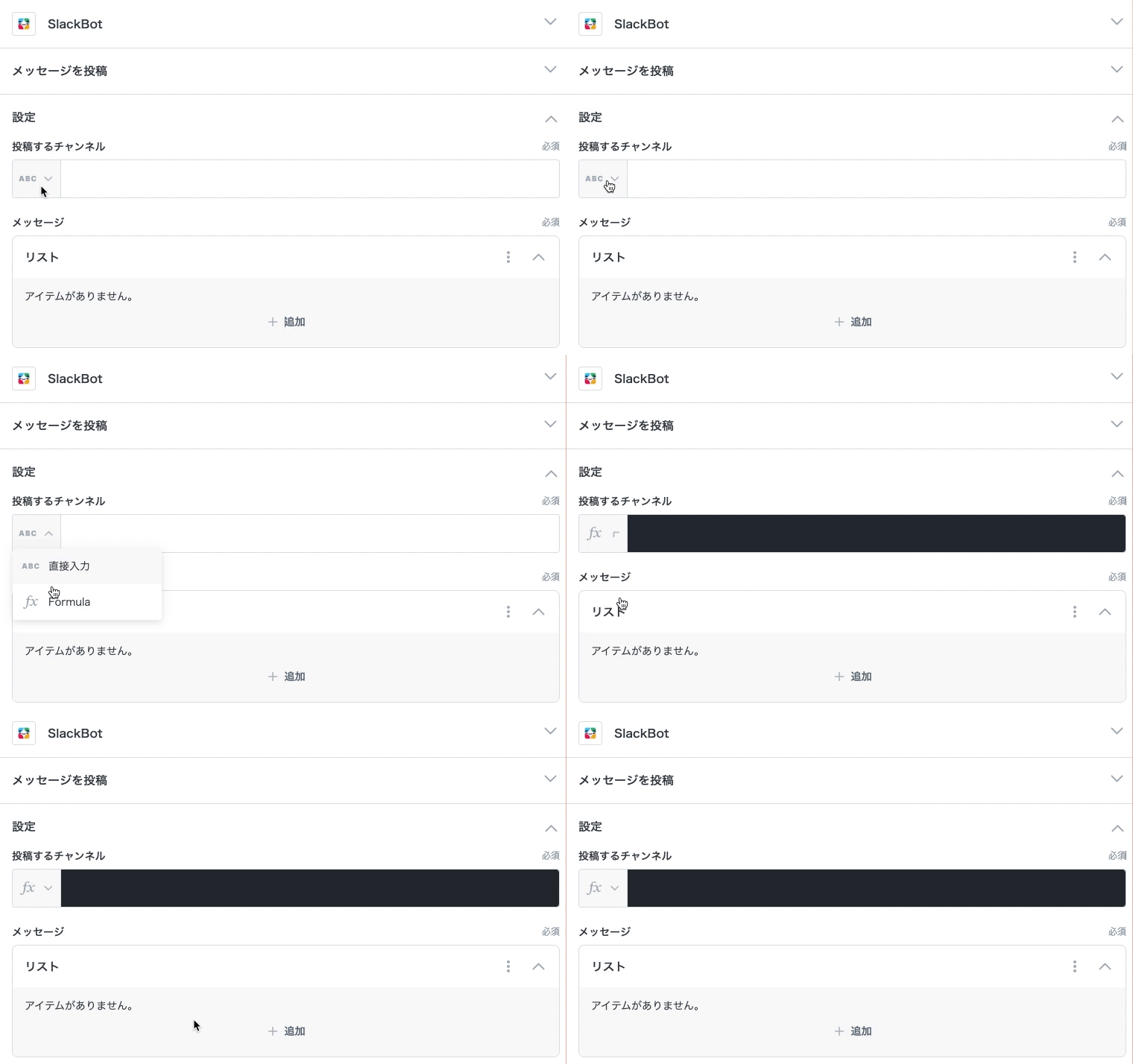
Formulaを使うためには、Formulaモードにする必要があります。
入力フィールドの左側をクリックすると背景色が変わりFormulaモードに切り替わります。\
また、左側のタイプアイコンも`fx`アイコンに変更されます。
Formulaモードはfxマークで表示されます
## 使用可能な記法
基本定数
* `None`:null(値が存在しない)を示す定数
* `True` / `False`:真または偽を表す真偽値定数
型変換
* `bool(x)`:真偽値に変換する
* `str(x)`:文字列に変換する
* `int(x)`:整数に変換する
* `float(x)`:浮動小数点数に変換する
* `chr(x)`:Unicodeコードを文字に変換
* `ord(x)`:文字をUnicodeコードに変換
* `hex(x)`:16進数文字列に変換
* `oct(x)`:8進数文字列に変換
* `json_dumps(obj)`:オブジェクトをJSON形式の文字列に変換
* `json_loads(str)`:JSON文字列をオブジェクトに変換
数字
* `abs(x)`:x の絶対値を返す
* `max(iterable)`:最大値を返す
* `min(iterable)`:最小値を返す
* `sum(iterable)`:合計値を返す
* `pow(x, y)`:x の y 乗を返す
* `round(x)`:x を四捨五入して返す
* `floor(x)`:x を切り捨てる(小数点以下切り捨て)
* `ceil(x)`:x を切り上げる(小数点以下切り上げ)
* `all(iterable)`:すべての要素が真なら True を返す
* `any(iterable)`:いずれかの要素が真なら True を返す
文字列
#### 関数
* `re.search(pattern, string)`:正規表現で部分一致検索
* `re.sub(pattern, repl, string)`:正規表現による文字列置換
* `zenkaku_to_hankaku(str)`:【Anyflow独自関数】 全角文字を半角に変換
* `hankaku_to_zenkaku(str)`:【Anyflow独自関数】 半角文字を全角に変換
#### 大文字・小文字変換メソッド
* `.lower()`:すべて小文字に変換
* `.upper()`:すべて大文字に変換
* `.capitalize()`:先頭のみ大文字、他は小文字に変換
* `.title()`:各単語の先頭を大文字に
* `.swapcase()`:大文字と小文字を反転
* `.casefold()`:比較用の小文字変換(より厳密)
#### 配置・埋め込みメソッド
* `.center(width)`:中央寄せで文字列を埋める
* `.ljust(width)`:左寄せで埋める
* `.rjust(width)`:右寄せで埋める
* `.zfill(width)`:左側をゼロで埋める
#### 検索・位置取得メソッド
* `.find(sub)`:部分文字列の位置(見つからなければ -1)
* `.rfind(sub)`:右から検索
* `.index(sub)`:見つからなければエラー
* `.rindex(sub)`:右からの位置(エラー有)
* `.count(sub)`:出現回数
#### 判定系メソッド
* `.startswith(prefix)`:指定文字で始まるか
* `.endswith(suffix)`:指定文字で終わるか
* `.isalnum()`:英数字かどうか
* `.isalpha()`:アルファベットかどうか
* `.isascii()`:ASCII 文字かどうか
* `.isdecimal()`:10進数字か
* `.isnumeric()`:数値文字か
* `.isspace()`:空白のみか
* `.islower()`:すべて小文字か
* `.isupper()`:すべて大文字か
* `.istitle()`:タイトル形式か
#### 分割・結合メソッド
* `.split(sep)`:区切りで分割
* `.rsplit(sep)`:右から分割
* `.splitlines()`:改行で分割
* `.partition(sep)`:最初の区切りで3つに分割
* `.rpartition(sep)`:右からの区切りで分割
* `"sep".join(iterable)`:文字列のリストを結合
#### 変更・整形メソッド
* `.replace(old, new)`:文字列の置換
* `.strip(chars)`:前後の指定文字を削除
* `.lstrip(chars)`:左端を削除
* `.rstrip(chars)`:右端を削除
* `.expandtabs(n)`:タブをスペースに変換
配列・辞書
* `len(x)`:要素数を返す
* `list(x)`:リストに変換する
* `dict(x)`:辞書に変換する
* `tuple(x)`:タプルに変換する
* `set(x)`:集合に変換する(重複を削除)
* `zip(a, b)`:複数の配列を要素ごとに結合
* `enumerate(x)`:インデックスと要素のペアを生成
* `range(n)`:整数の範囲を生成(0 から n-1 まで)
* `sorted(x)`:並び替えたリストを返す
* `groupby(iterable)`:【Anyflow独自関数】 指定キーでグループ化
* `get_first(list)`:【Anyflow独自関数】 リストの先頭要素を返す
日付・時間
#### 関数
* `str_to_date(str)`:【Anyflow独自関数】 文字列を日付型に変換
* `str_to_datetime(str)`:【Anyflow独自関数】 文字列を日時型に変換
* `utcnow()`:【Anyflow独自関数】 UTC 現在時刻を返す
* `jstnow()`:【Anyflow独自関数】 日本時間の現在時刻を返す
#### メソッド
* `.add(**kwargs)`:指定した時間を加算(例:`add(days=3)`)
* `.subtract(**kwargs)`:指定した時間を減算
* `.start_of("unit")`:指定単位("day", "month" 等)の開始時刻を取得
* `.end_of("unit")`:指定単位の終了時刻を取得
* `.format(format_string)`:指定書式で文字列に変換
* `.isoformat()`:ISO 8601 形式で出力
* `.is_future()`:未来の日付かどうか判定
* `.is_past()`:過去の日付かどうか判定
* `.weekday()`:曜日を数値(0〜6)で返す
* `.in_timezone("Asia/Tokyo")`:タイムゾーンを変換
* `.is_dst()`:夏時間かどうか判定
* `.is_utc()`:UTCかどうか判定
#### 共通属性(日時・日付どちらでも使用可能)
* `.day`:日(1〜31)
* `.month`:月(1〜12)
* `.year`:年(例:2025)
* `.quarter`:四半期(1〜4)
* `.day_of_week`:曜日(0=月曜日, 6=日曜日)
* `.day_of_year`:年初からの日数(1〜366)
* `.week_of_month`:月の週番号(1〜5程度)
* `.week_of_year`:年の週番号(ISO 8601形式:1〜53)
* `.days_in_month`:その月の日数(28〜31)
#### 時間属性(日時オブジェクトのみ使用可能)
* `.hour`:時(0〜23)
* `.minute`:分(0〜59)
* `.second`:秒(0〜59)
* `.microsecond`:マイクロ秒(0〜999999)
* `.int_timestamp`:UNIXタイムスタンプ(整数)
* `.float_timestamp`:UNIXタイムスタンプ(小数点付き)
* `.offset`:UTCからの秒単位オフセット(例:+32400秒)
* `.offset_hours`:UTCからの時間単位オフセット(例:+9.0)
* `.timezone_name`:タイムゾーン名(例:`"Asia/Tokyo"`)
エンコーディング・暗号化
#### 関数
* `b64encode(str)`:【Anyflow独自関数】 Base64 で文字列をエンコード
* `b64decode(str)`:【Anyflow独自関数】 Base64 でデコード
* `quote(str)`:【Anyflow独自関数】 URLエンコード
* `unquote(str)`:【Anyflow独自関数】 URLデコード
* `hmac.new(key, msg, digestmod)`:HMAC署名を作成
#### メソッド
* `.encode()`:文字列をバイト列に変換
* `.decode()`:バイト列を文字列に変換
CSV
#### 関数
* `csv.reader(csvfile, delimite, quotechar, quoting)`:CSVリーダーオブジェクトを返す(イテレータ形式、全行取得には.to\_list()を使用)
* `csv.DictReader(csvfile, fieldnames, delimiter, quotechar, quoting)`:CSVの各行を辞書となっている、CSV DictReaderオブジェクトを返す(イテレータ形式、全行取得には.to\_list()を使用)
* `csv.Sniffer().sniff(sample, delimiters)`:与えられたサンプル文字列から、区切り文字や引用符などの CSV フォーマットを推定する。
* `csv.field_size_limit()`:フィールドの最大サイズ制限を取得する(読み取り専用)
#### 定数
* `csv.QUOTE_ALL`:すべてのフィールドを引用符で囲む
* `csv.QUOTE_MINIMAL`:必要な場合のみ引用符で囲む(デフォルト)
* `csv.QUOTE_NONE`:引用符を一切使用しない
* `csv.QUOTE_NONNUMERIC`:数値以外のフィールドを引用符で囲み、読み込み時は数値に変換
#### クラス・ダイアレクト
* `csv.Error`:CSVパースエラー時に送出される例外クラス
* `csv.excel`:Excel形式に対応したダイアレクト(区切り文字はカンマ)
* `csv.excel_tab`:Excelのタブ区切り形式に対応したダイアレクト
* `csv.unix_dialect`:UNIXスタイルのCSV形式に対応したダイアレクト(カンマ区切り、ダブルクオート引用)
その他
* `condition(condition, true_value, false_value)`:【Anyflow独自関数】 条件式に応じた値を返す(三項演算子)
---
# Agent Instructions
This documentation is published with GitBook. GitBook is the documentation platform designed so that both humans and AI agents can read, navigate, and reason over technical content effectively. Learn more at gitbook.com.
## Querying This Documentation
If you need additional information that is not directly available in this page, you can query the documentation by asking a question.
Perform an HTTP GET request on the following URL with the `ask` and `goal` query parameters:
```
GET https://docs-embed.anyflow.jp/solution-editor/common-specs/formula.md?ask=&goal=
```
`ask` is the immediate question: it should be specific, self-contained, and written in natural language.
`goal` is what the user is ultimately trying to achieve, the reason they need the answer. Sharing it helps GitBook give you a better, more relevant answer. A goal is most helpful when it describes the outcome the user wants rather than restating the question. For example, with `ask=how do I create an API token`, a goal like `automate deployments from our CI pipeline` lets GitBook tailor the answer to that use case.
The response will contain a direct answer to the question and relevant excerpts and sources from the documentation.
Use this mechanism when the answer is not explicitly present in the current page, you need clarification or additional context, or you want to retrieve related documentation sections.