> For the complete documentation index, see [llms.txt](https://docs-embed.anyflow.jp/llms.txt). Markdown versions of documentation pages are available by appending `.md` to page URLs; this page is available as [Markdown](https://docs-embed.anyflow.jp/ops/delete-enduser.md).
# エンドユーザーの削除
自社サービスの契約終了などで、連携機能を利用しなくなったエンドユーザーのインスタンスは、管理画面上より削除が可能です。\
以下の操作により、特定のエンドユーザーがインストール済みのすべてのソリューションを一括でアンインストールすることができます。\
解約クライアントの認証情報を削除したいケースなどにも有効です。
## エンドユーザーの削除方法
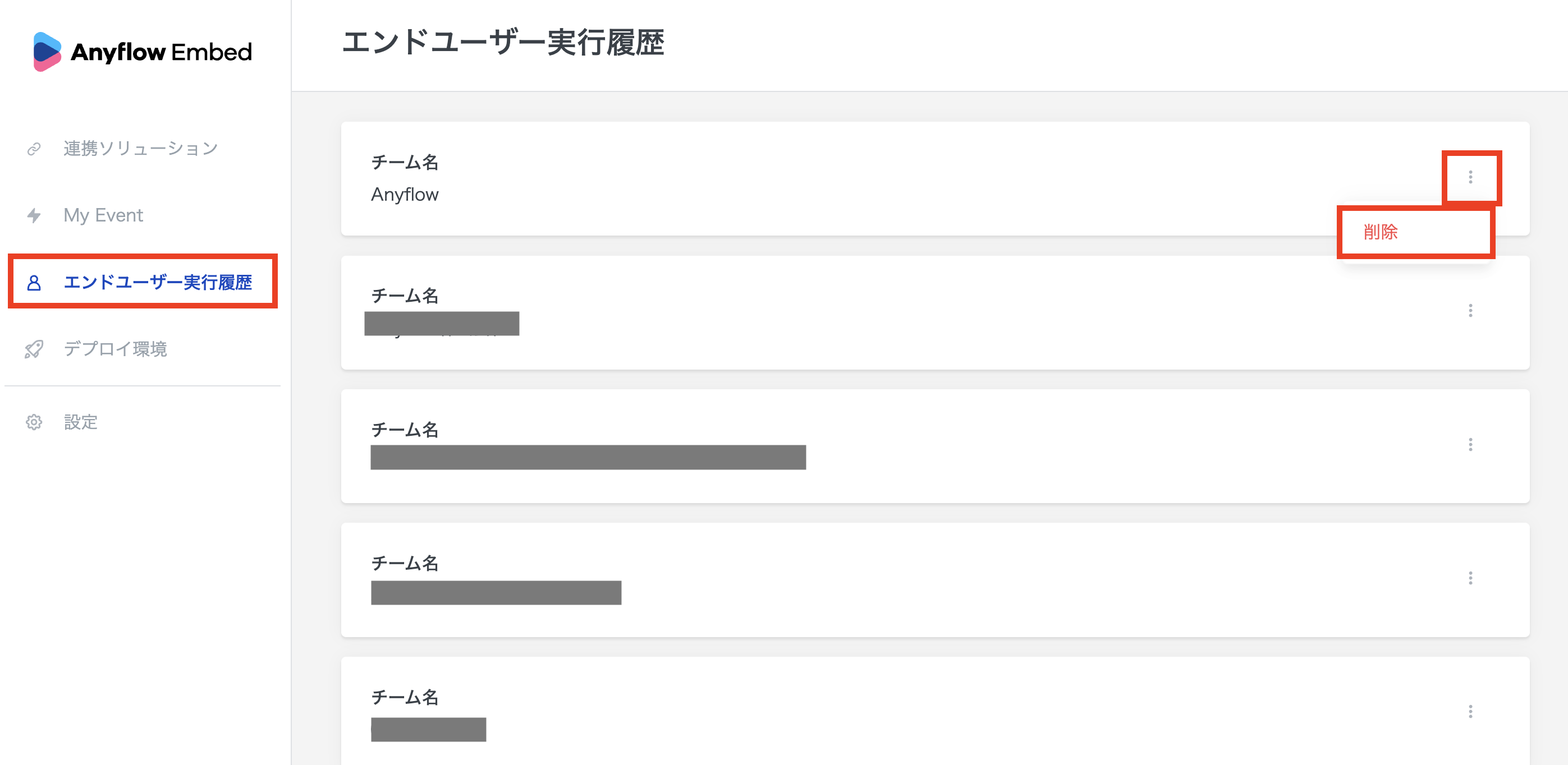
[エンドユーザー実行](https://embed.anyflow.jp/end-user-teams)>削除対象のエンドユーザーの3点リーダーを押下>削除を押下
{% hint style="danger" %}
### 削除する前にもう一度確認しましょう
一度削除したエンドユーザーは復旧することができません。\
削除対象のエンドユーザーがお間違い無いことを十分に確認の上、ご対応ください。
{% endhint %}
---
# Agent Instructions
This documentation is published with GitBook. GitBook is the documentation platform designed so that both humans and AI agents can read, navigate, and reason over technical content effectively. Learn more at gitbook.com.
## Querying This Documentation
If you need additional information that is not directly available in this page, you can query the documentation dynamically by asking a question.
Perform an HTTP GET request on the current page URL with the `ask` query parameter, and the optional `goal` query parameter:
```
GET https://docs-embed.anyflow.jp/ops/delete-enduser.md?ask=&goal=
```
`ask` is the immediate question: it should be specific, self-contained, and written in natural language.
`goal` is optional and describes the broader end goal you are ultimately trying to accomplish on behalf of the user. GitBook uses it to tailor the answer towards what is most useful for that goal.
The response will contain a direct answer to the question and relevant excerpts and sources from the documentation.
Use this mechanism when the answer is not explicitly present in the current page, you need clarification or additional context, or you want to retrieve related documentation sections.